Odoo ERP
 Mobile app development
 Acumatica Cloud ERP
 Hire a developer




Acumatica Cloud ERP System Software Solutions


Get Free Consultation
Why do you need Acumatica Cloud ERP for your business?

COVID-19 is requiring us to support and empower a remote workforce

We are investing in many other cloud applications

We need better visibility across our business

We are exploring an even bigger web relationship with our customers

We can't afford a significant upfront license cost for our new system
New To Acumatica ERP? How Do We Make It Work?
Requirements Analysis
This phase consists of documenting the processes and disconnected software you are currently using including spreadsheets. We will also go into detail on the modules you need relevant to your business during this phase. We will analyze all documentation to help support the next phase.

Acumatica Demo
This phase consists of an overview Acumatica demo. Team members from both Confianz and Acumatica will be present for this custom demo and presentation.
Acumatica Onboarding
This phase consists of providing your firm with detailed project costs and timelines with defined deadlines. Once approved, we will work with you on implementation, data migration, training and go-live support.

Continued Support
We are not done once you are live on your Acumatica ERP system. We will continue to provide you with 24/7 support and preventive maintenance.
Acumatica Promise

Readily comprehensible and not frequently modified
SaaS end-user license agreement (EULA)
Consumption-based licensing that does not inhibit business growth
A flexible, open platform for rapid integrations
ERP implementations without hidden fees
Deployment flexibility
Sustainable pricing with annual increases of no more than 3%
Advantages Of Acumatica Cloud ERP
Get lots more information at your fingertips in real-time
Make faster decisions
Get a future-proof foundation for your company
Get the business continuity you deserve
User-friendly ERP
Great support team
Experience the joy of running a paperless company
Manage your company from anywhere
Rapid integration
How Much Does It Cost To Implement Acumatica ERP?
Acumatica ERP is focused on the customer and their needs. It is essential that you talk with our team in detail to document your specific needs. This process makes sure you do not pay for a module or a service that you would never use in your business.
Please schedule a call with our team by clicking the button below.
Contact Us

Acumatica Construction management system
Construction Financials
Payroll
Construction App Integrations
Job Cost Accounting
Project Management
Modern Cloud Platform

Acumatica distribution management system
Advanced Financials
Fullfillment and inventory Management
Advanced pricing and discounting
Sales and order management
Warehouse management system
Requisition management
Acumatica Manufacturing management system
Bill of materials and routings
Shop floor data collection via scanners
Estimating
MRP (Material Requirements Planning)
Production scheduling and costing
Product configurator

Acumatica Commerce management system
Omnichannel back end delivery
Warehouse management
Intergrated tax and shippping
Sourcing management
Integrated financials
Commerce connector for major eCommerce platforms

Acumatica Field Service management system
Service order scheduling and dispatch
Warranty tracking
Real-time GPS routing for field staff
Equipment maintenance
Service contracts
Mobile voice and image reporting
Why Customers Choose Acumatica Over Other ERP?
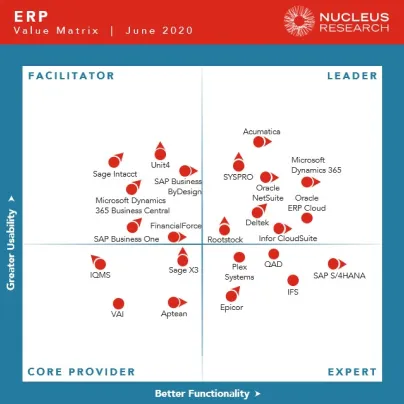
Acumatica Ranked Highest in Usability
“The focus on usability and customer value should continue to serve the vendor well in future editions of the Value Matrix.”
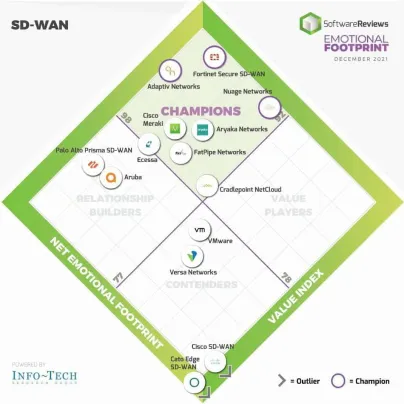
Acumatica ranked a champion in user sentiment
“The Net Emotional Footprint measures high-level user sentiment in the areas of service, negotiation, product impact, conflict resolution, and strategy and innovation.”
Key features of Acumatica ERP

Customer Management
Manage all customer interactions, support issues, pricing, returns and more.
Project Accounting
Manage budgeting, inventory, change orders, timesheets, billing, and profitability for your projects
Mobile
Work from anywhere, anytime with ios and android mobile applications
Advanced Financials
A feature-rich accounting suite to track daily financial operations and generate powerful financial statements.
Reporting And Dashboards
Gain greater insights into your organization with robust reporting and analytic tools.
Payroll
Easily cut overhead expenses and keep your employees happy with in-house payroll.
FAQ
- Mike Shchelkonogov has over 15 years of experience with ERPs. He was the director of engineering for Parallels, a virtualization software company founded by Bell. Previously, he was the CTO of the SWsoft consulting division, which implemented custom ERP solutions. He is now the Chief Technology Officer at Acumatica.
- Serg Bell was with Acumatica for 11 years. He acted as the chairman of the board and advisor. Before Acumatica, he founded Solomon Software in Singapore, where he re-engineered projects for Microsoft and Pervasive software, both of which still exist.
- Before Acumatica, John Howell worked with Solomon Software with Serg Bell and Mike Shchelkonogov for 20 years. He acted as Channel Architect and software developer.
- The customer bill of rights ensures that customers have a great experience and are more likely to recommend the ERP to others.
- Acumatica spends 74 percent of its revenue on research and development to ensure the product continually improves and stays on the cutting edge of innovation.
- The company’s flexible and future-proof cloud solution is attractive to customers looking for long-term solutions and a model that can grow with them.
- Acumatica’s dedication to its customer base consistently sets it apart from other companies and ensures its impressive growth rate will likely continue.
- Small and medium-sized manufacturing companies
- Retailers and wholesalers
- Construction firms
- Government agencies
- Nonprofit organizations
- Professional service providers (accountants, attorneys, consultants)
- Healthcare organizations
- Accounting – it offers a complete set of accounting tools for managing the financials of a business.
- Inventory – it has inventory management tools that are easy to use.
- CRM – it provides customer relationship management tools.
- ERP – it has enterprise resource planning tools that are designed to help with all aspects of running a business.
You simply need to fill out a brief form with:
- Work email
- Your business’s needs
- Your industry
- Time frame
- And country
- Software updates
- Automatic scheduled backups
- System monitoring
- SaaS is an annual subscription license that is hosted in a public cloud. It’s a set monthly payment. With the subscription, Acumatica essentially takes on the role of IT for your company’s ERP needs. They handle upgrades and other maintenance and troubleshooting tasks.
- Private Cloud Subscription (PCS) gives you the same ERP but changes the hosting option. Instead of a public cloud like Amazon Web Services, your business can choose the cloud and hosting provider.
SQL is server-based software that allows users to access data from any device with an internet connection.
It supports various types of storage, including:
- Filegroups and tablespaces store data files in the filesystem;
- Memory-optimized tables store data entirely in RAM;
- Clustered columnstore indexes store large amounts of sparsely populated data across multiple disks.
You can always check your database usage within the application on the screen named Space Usage. T
For private cloud deployments, there are other options.
- 24/7 access
- Monitoring
- Disaster recovery
- Backup services
- Software updates
- Application maintenance
Generally, maintenance will be scheduled and announced at least a week in advance. This will, for the most part, be less than half of an hour per week that occurs on weekends or during non-peak hours.
Unscheduled maintenance is sometimes necessary for security or emergency bug fixes, but Acumatica will try to contact you to let you know as soon as they know.
During maintenance, Acumatica SaaS is unavailable for use since they need to disable the program to change the programming.
Acumatica assures customers that they make every effort to minimize the duration and frequency of maintenance.
That is why Acumatica sells reserved resources to ensure that your ERP’s performance never dips. Your Acumatica partner will walk you through the process of choosing the correct level of dedicated resources to purchase with your SaaS.
Your level depends on how large your business is and how much you rely on your ERP. If this changes at any point, or you find yourself getting too close to the cap, you can upgrade your level whenever.
That's the first fail-safe. But if the tools haven't caught the issue, you can do a couple of other things.
If you’ve checked and made sure your system isn’t running slow because of insufficient resources, report the problem to your Acumatica partner. They will contact Acumatica as a representative of your business that knows your unique situation.
However, this is only regarding overall system slowness. If you’re experiencing connectivity issues with the system where you can’t log in or connect, you can report the problem here.
You can only get an accurate estimate of how many resources you’ll need from your Acumatica Partner. But the way they judge your system resource load is by how much you require during peak usage times.
So while you may not use that many resources at night or on weekends, your resource level will depend on when you're processing the most transactions. This ensures you won't experience slowdowns when most of your business is happening
Transactions can include:
- Vendor payments
- Payments
- Purchase Receipts
- Shipments
- AR Invoices
- Purchase Orders
- Sales Orders
- AP Bills
Acumatica provides its own CRM solution, but if you’re already on Salesforce, you may not want to make the switch because of the time it takes to migrate data.
If you're wondering if you can integrate the two, yes, it is possible. However, it's not a native solution. Only SAP and Oracle provide native integration solutions.
SYNC helps Acumatica integrate with Salesforce to provide a seamless experience for users. As the name suggests, SYNC automatically maps all the data from Acumatica to Salesforce and vice versa. It provides a single source of truth for data so that the user doesn't have to switch between multiple tools and applications.
Any field from Acumatica can be viewed in Salesforce and becomes part of its native database. This provides the added benefit that you can perform Salesforce’s CRM functions on your Acumatica data and use Salesforce’s third-party program offerings.
However, be warned that you can’t push these changes into your existing system. Once you refresh, they’re gone forever. So make sure you document what you want and what you’ve done so you can replicate it on your ERP.
The sandbox is based on your backups. So it needs to be updated whenever you make significant system changes. This is a manual process that Acumatica does charge a fee for.
- Acumatica performs constant automated backups. You can request a backup for a one-time fee or subscribe to the access service annually. This happens during a 2-hour window every day, when you may experience slowdowns.
- The other method is database snapshots. These are copies of your entire database that you perform yourself on demand that you can use to restore your system to that exact moment. Be warned that since it's a complete snapshot, it's the same size as your database, which can eat into your storage. You can restore these yourself at any point.
Acumatica can restore your system to an earlier state if you are subscribed to the data recovery service. However, if you are not, it’s doubtful they can restore your system since their backups are meant for global situations and not individual scenarios.
All data transmitted to the cloud is secured and encrypted with SSL security. If you use the URL that Acumatica provides, it is automatically protected. If you use your own, you need to provide your own certificate.
They also have an intrusion detection system that works to find any attempt to breach your data's privacy or security. They immediately lock intruders out if the intrusion detection system detects someone trying to access the system. Acumatica then investigates the identity of the attacker. They can also restrict access to your company's specific IP addresses in the system.
You can also specify who can access different system elements by assigning security credentials. These credentials can either be based on the role of the user or very specific to an individual's login. You can also track an individual's activities.
If a security violation does occur, you can report it to their Incident Response Team here.
They also have extensive fire, power, climate, and temperature detection and regulation systems in place. This ensures that all physical threats are at a minimum. If anything does happen, Acumatica also has multiple data centers in different geographic locations to ensure your system never goes down.
They also can provide a copy of your data to you within those 30 days. This way, even if you don’t choose to reactivate within that time, you can still return to Acumatica at any point without needing to migrate your data.
Acumatica Cloud ERP Related Services
Acumatica Support
Acumatica Integration
Join Other Market Leaders
Acumatica ERP Supports A Wide Range Of Integrations
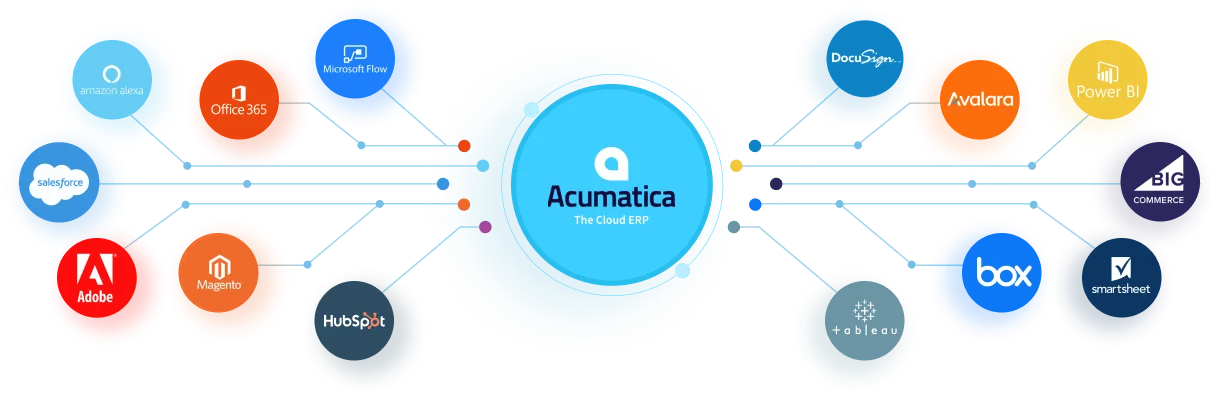
+ 150 More Integrations available out of the box
Hear From Real Customers Why They Love Acumatica
"With Acumatica we worked with Klear Systems to add a custom fee tab and a few custom reports. The ease of personalization in Acumatica has been a game changer for everybody, and it's allowed us to work better and service our client needs.

Julia Pinto Cisneros
COO, Quality Material Handling, Inc.
"When we add a new company, we don’t have to buy extra software user licenses. We just create a new branch in Acumatica and quickly integrate them into Dukathole Group."

Graham Leonard
Chief Financial Officer & Operations Manager ,Dukathole Group
"Acumatica is magic. We haven’t found anything we can’t do with Acumatica."

Donna James
Statewide Finance Specialist, Cornell Cooperative Extension
"To have 100 percent visibility to everything no matter where we are in the world is invaluable."

Keith Ford
President, Eagle Fence Distributing
Awards and Recognition